How to Restrict USB Devices from Loading on Windows 7
USB devices provide and easy way for virus to spread and data to be stolen. To prevent this from happening, you can buy some software or if you are comfortable with tweaking the registry then you can do it yourself. This is how you can do it.
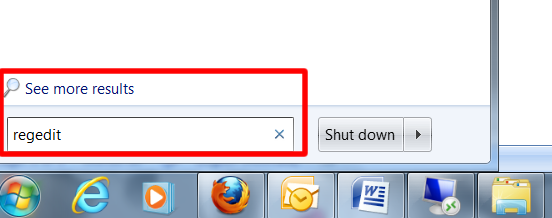
..by typing ‘regedit’ in the run/search box and press enter.
The first step is to load your registry. This can be done by typing ‘regedit’ in the run/search box and press enter.
Once the registry editor is open, the first thing is to create a back-up. This is just a precautionary measure should anything go wrong. Now the actual tweaking can begin.
In the left navigation panel, go to this location: HKEY_LOCAL_MACHINE > SYSTEM > CurrentControlSet > Services > USBSTOR

Double click on the registry key ‘Start’

Change the value from 3 to 4. The click OK and exit.

USB devices are now disabled. If you wish to change it back, then simply navigate to the same location and change the value back to 3.

Bernard is a writer, martial art enthusiast and geek.
Latest posts by Bernard Sinai (see all)
- PNG Government Introduces ICT Procurement Standards and Best Practices 2025 - October 16, 2025
- Understanding 5G: The Future of Connectivity - October 12, 2025
- Hackers Publish Qantas Customers’ Data on Dark Web After Third-Party Breach - October 12, 2025